Showing posts with label tfs. Show all posts

Wednesday, December 02, 2009

Team Explorer clear local cache

While switching between TFS Server (Team Foundation Server) it often happen that cached data on your local drive mass up connections.

To manage this simply clear the local folder which is used by the Team Explorer as local cache and everything should work again as planned.

What to do:

  • Close your Visual Studio
  • Navigate on your local drive to this location: "%userprofile%\Local Settings\Application Data\Microsoft\Team Foundation\2.0"
  • At this location you find a folder called "Cache" which is used by Team Explorer
  • You simply can rename the folder or even delete it. Team Explorer creates a new one upon next Start-Up of Visual Studio.
  • Start Visual Studio and access your TFS (Team Foundation Server) with a clean Team Explorer cache
enjoy :-)

Note: sometimes this applies if you try to create Team Project and it fails with the errro: TF30177. The above mention steps also helped me to resolve this issue: "TF30177: Team Project Creation Failed -> TFS 2010 Beta 2" - under Windows Server 2008 the cache folder of Team Explorer 2010 is located here: C:\Users\{username}\AppData\Local\Microsoft\Team Foundation\3.0\

Error
Unable to connect to the specified SQL Server Reporting Services at http://
{ServerName}/ReportServer/ReportService2005.asmx.
Explanation
The Project Creation Wizard was not able to connect to the SQL Server Reporting Services at http://{ServerName}/ReportServer/ReportService2005.asmx. The reason for the failed connection cannot be determined at this time. Because the connection failed, the wizard was not able to complete creating the SQL Server Reporting Services site.
User Action
Contact the administrator for the SQL Server Reporting Services at http:///ReportServer/ReportService2005.asmx to confirm that the server is available on the network and you have sufficient privileges to create a project. Also, you might find additional helpful information in the project creation log. The log shows each action taken by the wizard at the time of the failure and may include additional details about the error.


Thursday, November 12, 2009

TFS WSS extension installation for MOSS 2008 64bit

I found quite a lot of information about this issue around there but I had my problems to figure out where to download the extension. Finally I found them as a download link under "Visual Studio Team System 2008 Team Foundation Server Power Tools - October 2008 Release"

In the download section there is a download button for: WssExt64Bit.msi


Friday, October 16, 2009

MS Build Shell Extension

MSBuildShellExtension lets you build .NET projects without ever opening Visual Studio or the command prompt. MSBuild targets can be executed from your favourite file system tool like Windows Explorer or Total Commander. The possibility to extend MSBuildShellExtension with your own targets and editors, makes it a very flexible and useful tool for all .NET developers.


Wednesday, September 02, 2009

Team Foundation Server & and & and & and

During the past 2 years I installed TFS 2008 (Team Foundation Server 2008) at least 25 times most of it for testing and migration purposes. Same I had to do now for a migration scenario from two single installations into a multi-layer installation.

Since Service Pack 1 is out it's possible to install TFS 2008 on Windows 2008 (x-86) and as we know there is now Windows 20008 R2 out but there are no downloads for x-86. Therefore we have to take an earlier Version: Windows Server 2008.

The installation guidance describes exactly what you have to do to run the installation. You have to configure several files, need to adapt WML checks as I posted in my earlier post yesterday: http://netrsc.blogspot.com/2009/09/tfs-sp1-installation-problem.html

At the end of the day it worked beside the "Reporting Services" - as usual! I will try not to get emotional now but it should not be a problem for Microsoft to create installation files which are as easy to install as previous installations.

I mean how much effort Microsoft have to put to create an installer for the following setup:
  • Windows 2003 Server Enterprise / Standard
  • Sql Server 2008
Press 15 times enter, choose your servers and done - no they prefer to handle thousands of forum messages, emails, sending responses to blog post etc.

take 10 % of your communication efforts and put them into a normal installer for single and multi installations with new software.

I really hope Micorosoft consider this for the next TFS 2010.

Another feedback would be to create a personal version of TFS -> Mini Tfs which would fit to the express editions for home use :-)


Sunday, December 21, 2008

Visual Studio Team System 2008 Team Foundation Server Power Tools Explorer Extensions

I'm not a 100% sure but I think this is getting installed with Visual Studio Team System 2008 Team Foundation Server Power Tools:


Especially I like the comparsion with workspace version :-)

TFS - Customizing Process Template's - especially iterations!

I don't know how much hours I spent over the last few day's with TFS (Team Foundation Server) and the configuration around it. I can't understand why Microsoft is making this so hard while alternative products of Microsoft are easy for installation and handling (e.g. Visual Studio / SQL Server / any many more.....)

Let's talk about customizing TFS process templates. You don't need to but I strongly suggest you download the "Visual Studio Team System 2008 Team Foundation Server Power Tools". Once you have installed Visual Studio 2008 Team Foundation Server Power Tools you have a additional menu items below Tools->Process Editor.
Before you launch this you will have to download one of the provided Process Templates:

  • MSF for Agile Software Development - v.4.2
  • MSF for CMMI Process Improvement - v.4.2

To download a Process Templates you will have to choose from the menu: Template Process Manager

Choose your location on your drive and select "Save".


The output will saved as the following Print Screen display:

Now you can go back to your Visual Studio Menu and select: Tools->Process Editor
and select the File ProcessTemplate.xml on your disc.

You gone be surprised what you gone see !!!! At least I was it.


As long as you don't change anything within the iterations it should work when you make your changes save the file and upload it again over the Process Template Manager. But in case you are doing CHANGES AT ITERATIONS you gone face problems upon creating task when you try to add a new TFS Project Wizards.

The error you gone see in your TeamProjectCreation log file looks like this:
---begin Exception entry---
Time: 2008-12-21 14:09:12ZModule: Work Item TrackingEvent Description: TF26214: Cannot save the work item. Fields with errors: Iteration Path;IterationIDException Type: Microsoft.TeamFoundation.WorkItemTracking.Client.ValidationExceptionException Message: TF26202: Iteration Path is not a valid area or iteration path. In the Team menu, click Team Project Settings, and then click Areas and Iterations to review the valid area and iteration paths.Stack Trace: at Microsoft.TeamFoundation.WorkItemTracking.Client.WorkItem.PreValidate() at Microsoft.TeamFoundation.WorkItemTracking.Client.WorkItem.PreBatchSave() at Microsoft.TeamFoundation.WorkItemTracking.Client.BatchSaveHelper.BatchSave(WorkItem[] items)
--- end Exception entry ---


How do you handle this.

  1. Close your Process Template Manager
  2. Navigate to your Location on the disc where you have saved your Process Template and from there you navigate to the folder: Work Item Tracking
  3. Open the file: workitems.xml
  4. Now you have to replace all "$$PROJECTNAME$$\Iteration 0" with the iteration you have created, in my case it is:
  5. Upload and overwrite your Custom Process Template and you will be able to create your new project.

I hope VSTS is going to put a lot of efforts to make all this stuff much easier!

Friday, December 19, 2008

TFS, Reporting Server & Sharepoint

I have spoken over the last few weeks with a lot of people about Team Foundation Server / Reporting Services and Sharepoint WSS 3.0.

Microsoft have tried to do all efforts to create a very detailed installation help how to install TFS in all various modes but my personal conclusion is if I see how much people are running around the forums - why the hell they are not able to make one simple Next -> Next installer which will at least cover the basic mode and one for the distributed mode.

If you think how much hours the industry have spent on installing TFS and how much money this cost then it would make sense to me.

The next thing which I don't really like about TFS is the underdevelopment of maintenance tools. You have to grab everything together and more then that with all the hours TFS group people spending on the forums they could create amazing administration tools which would make much easier to the industry.

What are my expectations? Well I work daily hours over hours with Visual Studio and SQL Server Management Studio, why they make those fancy and amazing Tools but they are not able to manage it to develop such a tool within TFS - sad!

I life like the rest of the community in the hope that they gone invest for the next version some time for that stuff.

Wednesday, December 17, 2008

TFS, Reporting Server & Sharepoint

Does your interface complain about IReportViewerMessage? I searched whole-over my web.config files to identify and finally I found it in my Sharepoint Server web.config file:


I didn't do much else then to comment this line and tried to run it again. Ohh good, the good thing is:

  • Everything worked as expected
  • No errors are getting displayed on the websites or Event Log

The bad thing is:

  • Why the hell this happens?

Since 3 day's i haven't experienced any difficulties with this solution but who knows when it ill come.

MSBuild and MVC - does not work?

After I have added my sample MVC Solution to TFS I configured my build client to run a daily build. Challanges at this step:


- Issue: I missed to configure the Build Machine Port 9191

- how to solve: Open firewall and configure port 9191


Once I was able to connect to the build client from TFS when I queued a new build it failed. After googling a while i found a lot of people they had the same problem to build automatically mvc. the good thing is: "I'm not alone with building MVC applications with MSBuild"!


- Issue: Targets are not defined, but what the hell are those targets?

- how to solve:

- Step 1: Navigate at your development machine to the following location:

"C:\Program Files\MSBuild\Microsoft\VisualStudio\v9.0”

- Step 2: everything within this folder i have copied to my build client at the same location.

- Step 3: i downloaded MVC from http://www.asp.net/mvc again on my build client and installed it.

- Step 4: Added a new Build in my Visual Studio and it succeeded :-)


Wednesday, January 16, 2008

Text File does not get deployed from Class Library Project into Asp.NET Web Application

The issue sounds simple to me:

Text File does not get deployed from Class Library Project into Asp.NET Web Application

"We have a webproject and would like to deploy HTML and
Text Templates from a common Project into the web project
output folder.

The Attributes on the text / html files are set like this:
Build Action: Content
Copy to Output Directory: Copy Always
it just copy the files into the common csharp project under the bin/debug
but it doesn't appears within the web project.

any idea how to solve this issue without a lot of post build scripts?"

This have been posted 2 days ago I posted the following problem at:
http://forums.asp.net/t/1205184.aspx

To fix this issue you simply need to think in different direction - the oposite one :-)

Step 1: Don't add your files you would like to share in TFS (Team Foundation Server) into your Class Library Project - add files (html / xml / text / etc.) into your App_Data folder in your Asp.NET Web Application Project Type.
Step 2: Create your Folder within your Class Library Project you like to have the files. Once you have created the folder, you can right click on the folder and select : Add -> Existing Item

This will open you a dialog folder with a small HINT which is the BIG SHOOT for this issues. Don't simply add it while you press "Add" you need to select the small arrow near the Button and select "Add As Link" like the below printscreen shows:


Once you have done above steps, select your file and look at the file properties within your Visiual Studio. There you find some Attributes you need to check, you should check that the "Build Action:" is equal to "Content" and the "Copy to Output Directory:" is set to "Copy Always" or "Copy if newer".

In my case I do not need now to held the files redunded and sync them upon changes ....


just think different you will solve the problem!! was the motto upon this issue !

Tuesday, August 08, 2006

TFSWarehouseDataSourceView is missing - Shit Happens

how to restore tfs warehouse DataSourceView

C:\Program Files\Microsoft Visual Studio 8\VC>

C:\Program Files\Microsoft Visual Studio 2005 Team Foundation Server\Tools\SetupWarehouse.exe" -o -s SERVERNAME -d TfsWarehouse -c Warehouseschema.xml -a DOMAIN\SERVICEUSER -ra DOMAIN\REPORTUSER

Wednesday, April 19, 2006

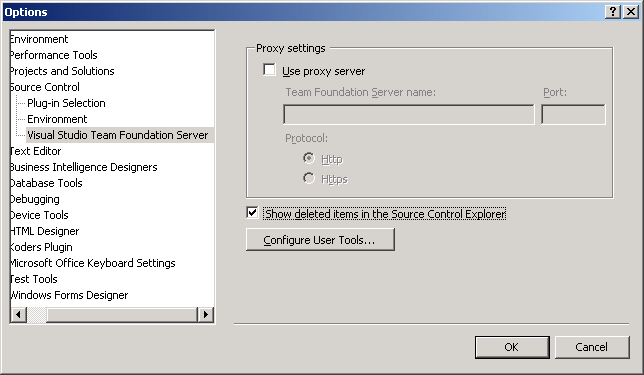
Team Foundation Server [TFS]: Show Deleted Items in Team Explorer

great, i searched for it but I could not find it was needed :-( So what to do if we want to make an undelete on a deleted item???

so here it is:


Visual Studio -> Tools -> Options -> Option Window

Left Tree -> Source Control -> Visual Studio Team Foundation -> Below the proxy settings

:-) how cute :-) INDEXUS!!!

Finally I can make an undo delete on my files

Some discussions around of Daily Builds

http://discuss.fogcreek.com/joelonsoftware/default.asp?cmd=show&ixPost=862

Implementing Daily Build and Smoke Test

One important aspect of Daily Build is the word Daily. Steve McConnel mentions two similar metaphors for a Daily Build in his article about Daily Build and Smoke Test:

On the one hand, Jim McCarthy [*] compares the Daily Build with the beat of a heart. Once the heart does not beat any more, the project has died. From another point of view, the Daily Build is an integral part of a functional software project in this context: A project without Daily Build is nonviable.

On the other hand, Michael Cusumano and Richard W. Selby [**] think of Daily Build as
a synchronization pulse. Code fragments of different programmers are allowed to come a little bit out of sync between two pulses but after the next sync pulse, all parts of the project must fit together again.

The next point to think about is a useful broken build management. It is very important to find a good balance between a too weak and a too strict contract. Such a contract should contain all the show stoppers that really break our project but exclude uncritical defects that only interrupt the software building process while being no threat to our projects healthiness.

Next issue to address is the need for a matching Smoke Test. The best Daily Build is worthless without a good designed and balanced Smoke Test. Such a Smoke Test must not include all features of the whole system (which would be very difficult to test) but should comprise the major parts of it. So if this test fails, we will know that we are in trouble.

Another important point is to let the development team know about the importance of not breaking the Daily Build. Most teams do so by introducing a penalty for that developer who is responsible for the clash, like a small fee. That programmer should then work on the problem until it is solved.

Goal of this strategy is to let a breaking build be the exception, not the rule.
Last but not least it is important to continue using Daily Build in stressful times, too. Especially in such situations, the effort for the build process can seem useless but it isn’t. Stressed developers make more mistakes, quality is decreasing -

Daily Build is then more necessary than ever.


* Steve McConnell. Daily build and smoke test. IEEE Software: Best Practices, 13(4), July 1996.
** Michael Cusumano and Richard W. Selby. Microsofts secrets. The Free Press, 1995.

Daily Build with Smoke Test!

the 4 big BENEFITS of using Daily Build with Smoke Test:

1.
- minimized integration risk Daily Build and Smoke Test
- different team members combining code they have been working on separately
- different team members integrating code they have been working on separately
- The resulting composite code might not work well.
- Depending on how late in the project the incompatibility is discovered, debugging
might take longer than it would have if integration had occurred earlier,
program interfaces might have to be changed, or major parts of the
system might have to be redesigned and re-implemented.
- Integration errors have caused projects to be cancelled.
- The daily build and smoke test process keeps integration errors small
and manageable, and it prevents runaway integration problems.


2.
- reduces the risk of low quality.
- unknown project status without using a daily build and smoke test strategy
- High risk of integration and quality problems [hidden faults is high] -
they expensive, in case of manpower and amount of coffee you need to fix them!!!!

3.
- easier defect diagnosis by giving exact indications of what happens with
your test. If case the daily build of day no. 4 succeeded and the following
day failed .. then you know where you have to search!

4.
- improves the team morale, they know about their quality and know they
working with up-to-date processes, not processes which are already more
then 20 years old!!
- Developers they see daily build is building successfully its a Hugh
morale boost for them (ahoy us! )
- its nothing really exciting or so, but programmers, testers and all the
rest of your team can watch how the project is growing and growing and
every morning you have an actually status about it.

Note: Yes the first project is hard to setup, until you get all what you need and you have setup everything, but in the end the result of it is amazing -> take yourself the needed time to setup daily build as soon as you can even when your project contains 1000 LOC's its the right way in my point of view.

Daily Build - The Daily Build concept

The Daily Build concept is integrated in nearly every new Software Engineering approach.

Personally I think that its common to use a separated build server applying the continuous integration approach / strategy. Call it however you want but in my point of view its a must.

The build server is responsible to request automatically request all sources from repository and its common to do that in a iteration of once a day. So this server is responsible to extract all sources and to build them. Its also common to integrate all your Unit test into this build to verify the integration. Oh, you don't have unit test ... what a pity... You should maybe checkout where the payback is of the additional effort of unit testing.

to make a build is much more then to press just F5 or F10 in visual studio or your preferred development environment. but anyway there are enough other sources you can receive the information what a complete build means [or check out previous posts.]

Lets go back to the issue of daily build, or the daily build concept.

Goals of Daily Build
There are several goals of daily build, but lets write about the main goal of it.
The main goal of Daily Build process is to integrate a periodical integration of all your software pieces.

Why periodically and not whenever when I want... 3 things..

1. in every handy made process the possibility of failures are here and usually they also not reproducible.
2. you have a build server, let him do the work. When it fails once then it always fails.
3. normally there are more then just one person who is working on sources.

The mention third point is very basically and can happen all the time. Just let the build process fail, which is really a bad problem for the project manager. If that happens, he or she has to locate the problem and solve it - or, even better, let the responsible programmers search for the problem in their code.

So, a developer has to write a few test cases which ensure the correct behavior of the main features or methods of his components. Which will be tested automatically every single night, and in the morning you get your report with all needed information why your daily build today failed ( or not failed ).

Shared Cache - .Net Caching made easy

All information about Shared Cache is available here: http://www.sharedcache.com/. Its free and easy to use, we provide all sources at codeplex.

Facebook Badge